Start with plain text for easier website updates
(Updated 5/21 with MailChimp information)
If you add text to your website by copying text from other sources, such as email, word-processing documents, online articles, and social media, it's important to convert the text to plain text before pasting it into your website.
Take out the formatting before pasting copied text
Any text you copy from these sources has hidden formatting instructions that determine what the text size, style, and color should be. For example, if you copy a paragraph from a Microsoft Word document that has 12 pt. black text in Times New Roman and paste it directly into your website, it will retain those instructions and disregard some or all of the text styles and colors that are built into your website. Sometimes the difference is subtle, but over time these differences will make your website look inconsistent and unprofessional.
A pro tip for handling copied text is to convert the formatted text to plain text to strip away the formatting. Then when you paste the text into your website, it adopts whatever styles your website requires. Squarespace provides a convenient way to convert copied text to plain text directly from the website editor.
Converting plain text in Squarespace
1. Open your website in Squarespace and prepare to edit the page and open the text block.
2. In another window, copy the text you want to use. This is an example of text from a tweet I want to copy.

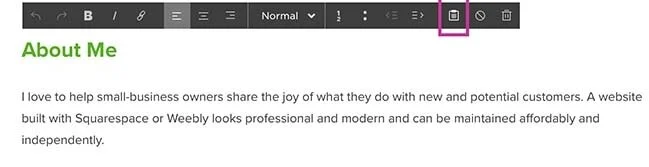
3. Go back to Squarespace and place the cursor in the text block where you want to insert the copied text and click the "Paste as plain text" icon.
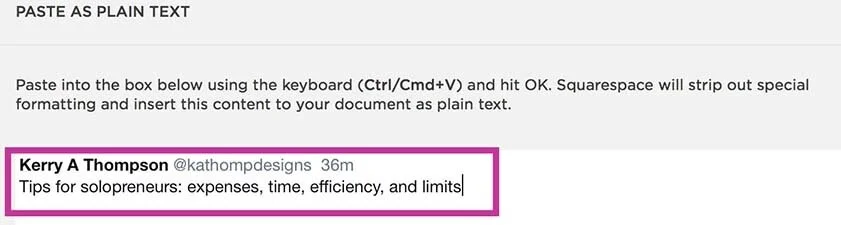
3. Paste the text into the Squarespace plain text editor.
5. Click OK.
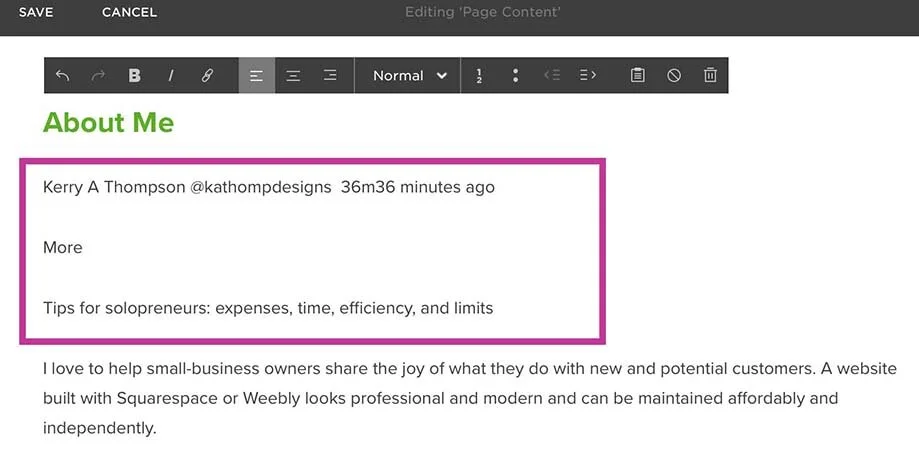
6. When you return to the text block, you will see your text copied in. You can see that I still need to do a little more cleanup to remove the words and extra line spacing I don't want. I also need to remove a hidden word "More" that I didn't know was in the text that I copied.
MailChimp
If you use MailChimp for your mailing list, I noticed the MailChimp classic editor now has a “Paste from Rich Text” editor. You can use this to remove formatting from any source documents that you’re using as the basis for my MailChimp text. Find out more here.
Using these tips will keep your website looking clean and consistent and it will be plain for all to see!
Adding links to your website gives people a convenient way to learn more about a subject that interests them. Links can be built into text, buttons, or images. Learn more about the guidelines I go by when deciding which type of link to use.
Writing, styling, and placing headings on a website page takes planning and intention. Use readable headings with just one Heading 1 per page and then Heading 2 and 3 as needed to outline the content.
Whether your website is new or has been around a while, decluttering the content to encourage visitors to browse is always a good idea.
Whether you want to archive a page for posterity or for your future use, here are the instructions for properly archiving the page without causing 404 Page Not Found errors on your Squarespace website.
The clickable image that shows up on social media posts is called a link preview image. In Squarespace and other website editors, you can designate a specific image to show up when you share a website page on Facebook, LinkedIn, or Twitter/X.
Being able to preview your website live without logging out of Squarespace is a convenience for testing and proofreading before you launch.
You can add a Social Sharing image to Squarespace to be shown as a link preview for your website when you share a URL on Facebook, LinkedIn, and Twitter. The size of 1200x628 pixels works best for those platforms. You can also set custom images for specific website pages or blog posts to draw extra attention to them.
A footer is the last section of information at the bottom of a website page. Use this valuable area to show contact information, add links to website pages, and ask visitors to take action on their way to becoming loyal customers.
Here are my 10 favorite text tips to help you create a modern and professional-looking website on Squarespace or any other website platform.
One of the first decisions you'll make with a new website is the choice of typefaces, especially those used as display accents throughout your site, such as the Site Title and Headings. Your website probably includes typefaces that suit the design template you chose, but if you would prefer another typeface, there are many to choose from.
As you start a blog, first determine the focus of your blog. Then choose topics that are relevant and that are in your area of expertise. Blog posts can contain text, images, videos, links to other blog posts, links to podcasts, and personal or creative endeavors. Each blog post adds content to your website and gives you cumulative client-attracting and SEO benefits.
Before you can choose individual topics to write about in your blog, first define the strategy for your blog as a whole. Knowing who your audience is and what they want to know will be the foundation for the content. It will also help you choose topics that fit the goals of your blog.
Understanding how text blocks work in Squarespace and how they interact with design blocks will help you shape your pages the way you want with indents, margins, columns, and more.
When you were in school, did you learn to put that extra Oxford comma in your lists? The choice is up to you, the style guides tell us, but to help your readers, keep your decision consistent throughout your website, your blog posts, and your social media.
Adding a blog to your website and keeping it updated is a great way to publicize your business. Search engines like Google reward websites that produce fresh content. Employing SEO best practices to add keywords to your blog posts increases the likelihood that potential customers will find you in online searches.
PDFs are a useful addition to your Squarespace website if you want to provide information that isn’t for general use or is too lengthy to add to a website page.
Whether you want to add a little emphasis or a bit of lightheartedness to your website, emojis give you another choice for adding a graphic touch that stands out.
You don’t need a big agency to get your website done. You just need the one right person. I offer Squarespace website design and content development services for creatives, coaches, and healers. Learn more in a free 30-minute consultation.