I use social media for my website design business to establish my expertise and promote my business, to get ideas from others in my field or related fields, and to inspire or share information with my potential or current small-business clients.
For the last four or five months, I've been trying to educate myself about how best to use my time on social media to let more people know that I help small businesses create websites on Squarespace and Weebly. I've attended a couple of useful seminars and there's no shortage of infographics, articles, blogs, and studies available to learn the latest research. In fact, it's too much information to keep up with!
As a one-person operation, I can't possibly achieve the recommended number of posts on numerous social media channels that the corporate social media managers use as their standard. Even if I were to automate and schedule posts, there's no way I could keep up with that level of marketing, while still running a business. But if you're curious about what social media managers do, here's a great article from Buffer Social about all the things that can be part of a social media marketing job: A Day in the Life of a Social Media Manager.
I have decided that my approach, given the time I have, is to do my best to post on several social media channels several times a week. I create original posts and I also share helpful posts from others in my industry. I researched where my potential customers are spending time online and now focus on posting in those locations. I created an infographic based on data from the Pew Research Center to summarize the audiences of five of the biggest social media products. YouTube is another widely popular social media site, but the study didn't include that data.

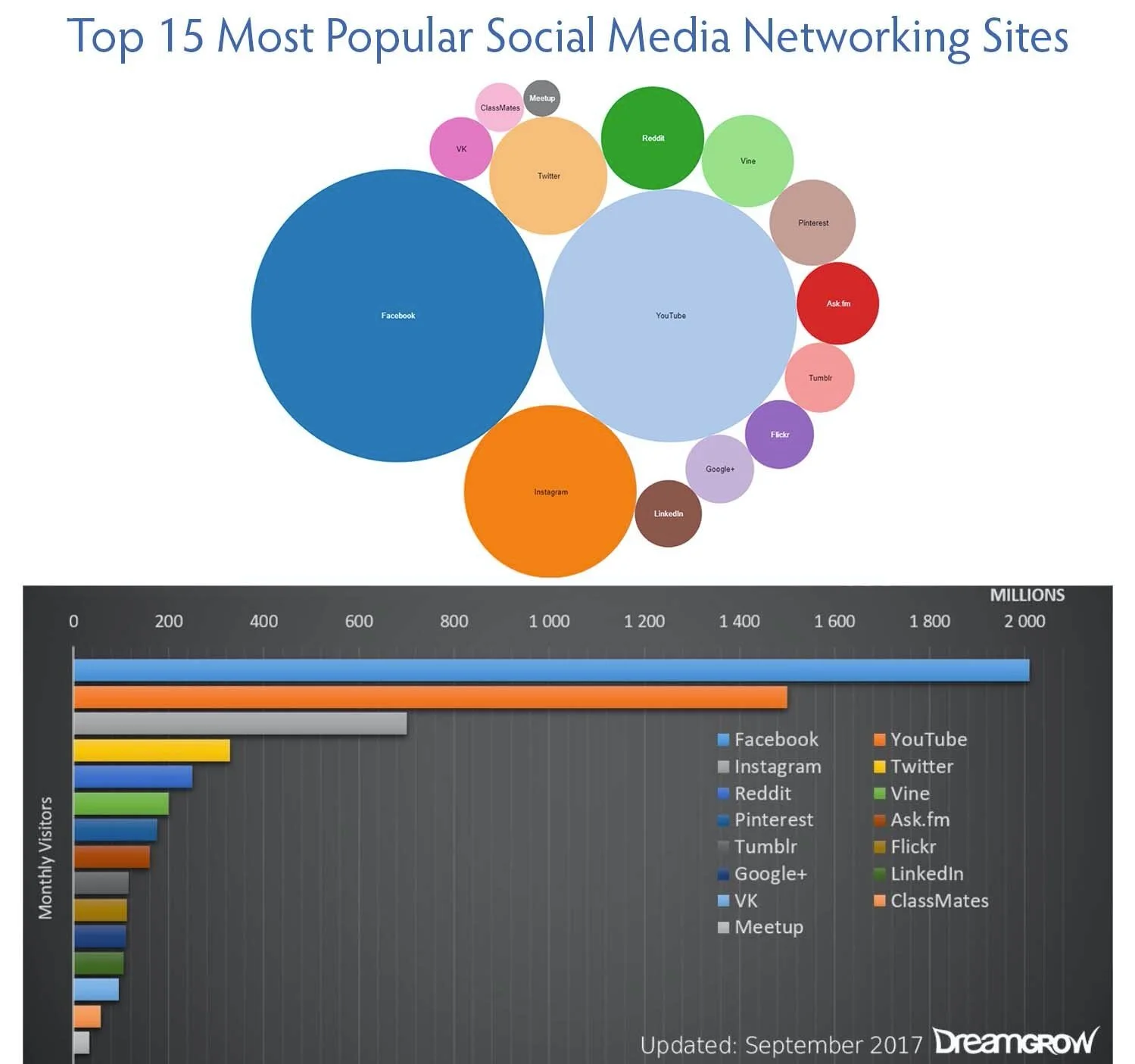
Facebook is popular with everyone, so I spend the most time there posting on my Facebook business page. (Please Follow my page, by the way!) I also spend time posting on my Inspiration for Entrepreneurs Pinterest board and on LinkedIn, where my potential clients spend their time. Then I also spend time on Twitter, where I get a lot of industry-specific news, and Instagram, where I share the same images I create for Pinterest. Videos aren't part of my social media strategy yet, but the pros say that they are very effective. Here are some images I found on Dreamgrow that show the relative popularity of 15 of the social media sites being used today.
I'm still negotiating my way through the social media world, so stay tuned. Whatever I learn, I'll share with you too. But remember, websites are still the heart of your business presence online. That's where I can help!

I recommend starting your business with a Google Workspace Business account so your business email address includes your domain name. But a personal Google account can be useful for many everyday tasks. In this blog post, I cover how the two types of accounts differ.

The clickable image that shows up on social media posts is called a link preview image. In Squarespace and other website editors, you can designate a specific image to show up when you share a website page on Facebook, LinkedIn, or Twitter/X.
Understanding in advance how your website will support your business will inform your website's design and content.

You can add a Social Sharing image to Squarespace to be shown as a link preview for your website when you share a URL on Facebook, LinkedIn, and Twitter. The size of 1200x628 pixels works best for those platforms. You can also set custom images for specific website pages or blog posts to draw extra attention to them.

Squarespace lets you promote your blog post automatically on your connected social media accounts through the Share settings for the post.

Taking the time to add a note to your invitation to connect to someone on LinkedIn improves the chances of the invitation being accepted. Adding information about how you know the person or mutual connections you have builds trust.

Use the Facebook Like Button Configurator to generate code to add a Facebook Follow button on your website.

I used the free version of MailChimp for several years and found it easy to use. I now use MailerLite because it allows a Welcome letter automation sequence that MailChimp no longer offers on the free plan. Still MailChimp is a good choice for small-business owners who want to add a newsletter to their site without the monthly cost of an email marketing plan if they only need to send new subscribers a single Welcome letter.

As you start a blog, first determine the focus of your blog. Then choose topics that are relevant and that are in your area of expertise. Blog posts can contain text, images, videos, links to other blog posts, links to podcasts, and personal or creative endeavors. Each blog post adds content to your website and gives you cumulative client-attracting and SEO benefits.

Adding a blog to your website and keeping it updated is a great way to publicize your business. Search engines like Google reward websites that produce fresh content. Employing SEO best practices to add keywords to your blog posts increases the likelihood that potential customers will find you in online searches.

After reading an article about self-employment time management, I started keeping a log of how I was spending my time on marketing and educational activities related to my website design business. Now I am much more deliberate about how I spend my time online and I've narrowed down my business-related social media focus to a few platforms.

One of the first pages you create for your website is the About page. It helps customers put a face and a story to the person behind the website. You don't need to be intimidated by the prospect of what to write. Think of it as a reply to "What do you do?" when someone asks you that question at a party.

If you have never had a website or have only created a website on your own without help, this blog post will explain the steps my clients and I take to go from our first talk to a finished website that helps their businesses shine online.

Service-based businesses usually have one or more pages that describe the services they offer. They should also provide enough information for people to take the next step toward hiring you.

The importance of posting testimonials on your website has been on my mind lately. Clever ads and slick marketing just can't take the place of testimonials. Nice words from real people serve to reassure people to take the next step of contacting you for a consultation or attending your upcoming event.

A blog has many benefits for increasing traffic to your website and improving SEO. But if you don’t love writing, there are alternatives.

People have been asking me recently what they need to put on a new website. What pages do they need? What information do they need to include? It occurred to me that a website is like an old-fashioned bakery, like those I've seen in the North End section of Boston or in small European villages.